Index Products Services About Contact
[ PRODUCT — TRADING BOTS ]

Rules you can read. Trades you can trace.

A rule-based automated trading system for MetaTrader 5 — built to a documented rule set, tested across market regimes, and shown to you exactly as it runs. No performance claims. No signals. No advice.

[ WHAT IS A TRADING BOT? ]

Automated trading, explained simply.

If you're new to this, here's the short version — no trading background required.

What it is

A trading bot is software that watches the market and places trades automatically, following a fixed set of rules — instead of you clicking buy or sell yourself.

What it isn't

It isn't a guarantee of profit, a person managing your money, or a way to remove risk from trading. It's a tool that executes a strategy consistently.

Why people use one

Markets move around the clock. A bot can watch price action continuously and act the moment its conditions are met, without fatigue or hesitation.

[ WHAT'S BUILT IN ]

Engineered with real structure, not a shortcut.

We won't walk you through the code — but here's the substance behind it.

Rule-based basket architecture

Manages multi-leg positions under a coded decision framework — every action follows a written condition, not a discretionary call in the moment.

One focused instrument, your choice

Purpose-tuned for a single instrument's own volatility and price behaviour on the M1 timeframe — currently available on XAUUSD or GBPJPY — rather than a generic template stretched across every pair.

Price-structure trend confirmation

Reads shifts in market structure before allowing new positions, rather than reacting to a single lagging indicator in isolation.

Daily loss limit

Automatically stops opening new trades once a defined daily loss threshold is reached, rather than trading through a bad day indefinitely.

Margin-aware sizing

Checks available margin before sizing a position, adjusting rather than assuming a trade will simply fit.

Spread & gap filtering

Holds off new entries when spread widens beyond a safe threshold, and pauses automatically after unusual price gaps.

Session-aware trading windows

Operates only within defined trading days and hours, rather than trading indiscriminately around the clock.

Automatic broker calibration

Detects your broker's specific symbol naming and contract specifications on startup, instead of assuming a fixed setup.

Resilient to disconnects

Reconciles open positions automatically if your terminal or VPS restarts, so nothing is left unmanaged after a drop.

[ SPECIFICATION ]

What it trades.

Instrument
XAUUSD or GBPJPY
Timeframe
M1
Structure
Basket / recovery
Leg cap
Fixed · hard limit

Recently upgraded to also support GBPJPY, diversifying beyond a purely USD-based instrument. The bot runs on one instrument at a time — you choose XAUUSD or GBPJPY when you configure it, not both simultaneously.

[ SEE IT ON CHART ]

What it actually looks like, running live.

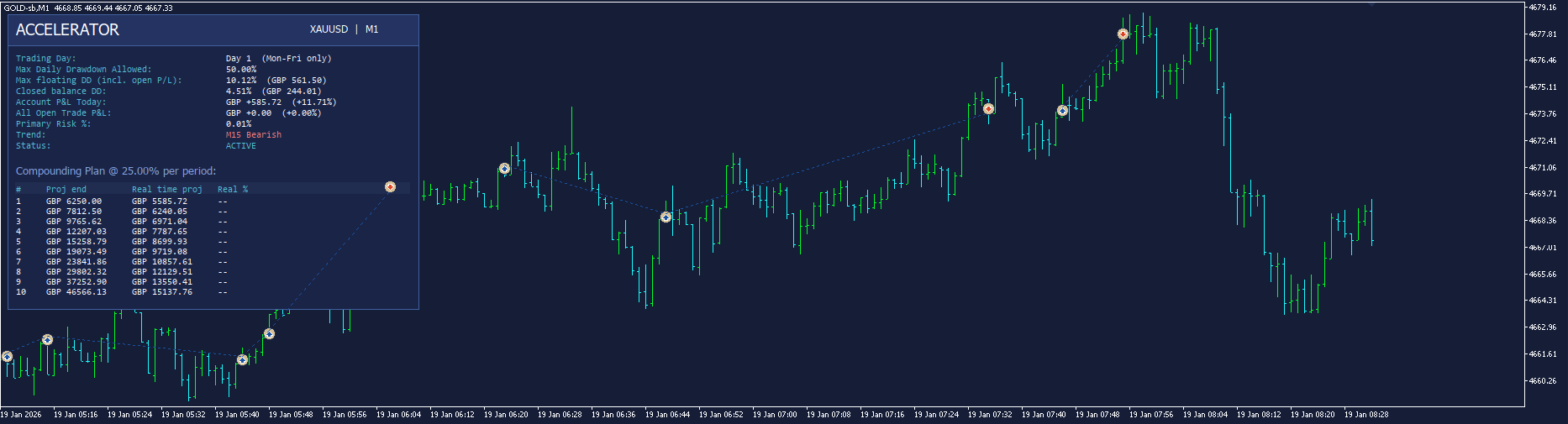
Five real screenshots from the terminal — no P&L headline figures, just the mechanics as they occurred on-chart. These show the XAUUSD variant; the same engine runs identically on the GBPJPY variant.

01

The EA in action

A live session on XAUUSD M1 — the on-chart HUD tracking trend, drawdown, and status while the bot manages the basket in real time.
MT5 · XAUUSD · M1
Accelerator running live on XAUUSD M1, day 3
02

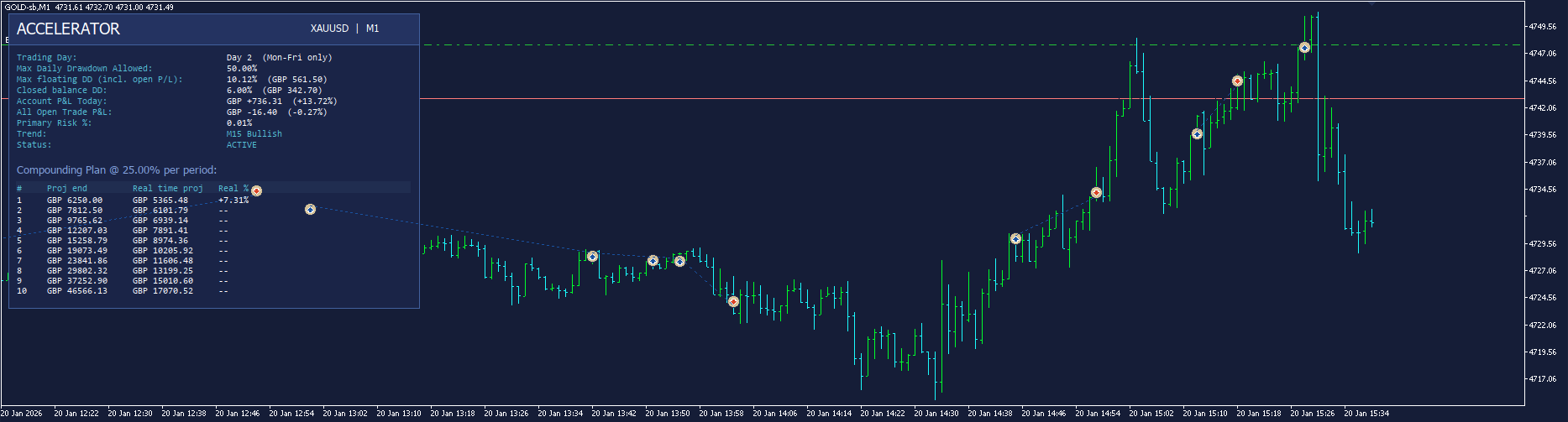
The EA in action

A separate session showing the same live operation across a longer stretch of price action, with the compounding plan table visible in the HUD.
MT5 · XAUUSD · M1
Accelerator running live on XAUUSD M1, day 1
03

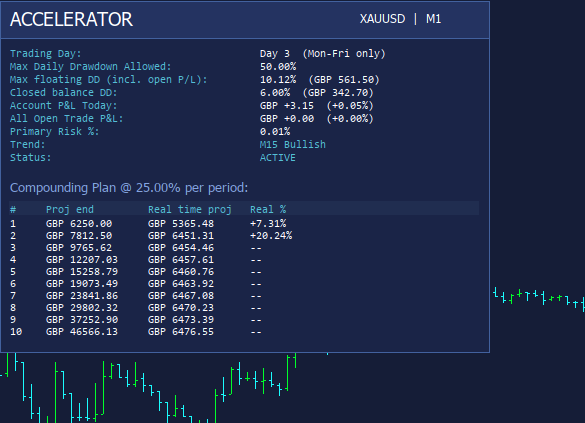
The HUD panel

A closer look at the on-chart dashboard: trading day, drawdown limits and current usage, today's P&L, trend read, status, and the compounding plan structure — everything visible at a glance, nothing hidden in a log file.
MT5 · XAUUSD · M1
Accelerator HUD panel close-up showing compounding plan
04

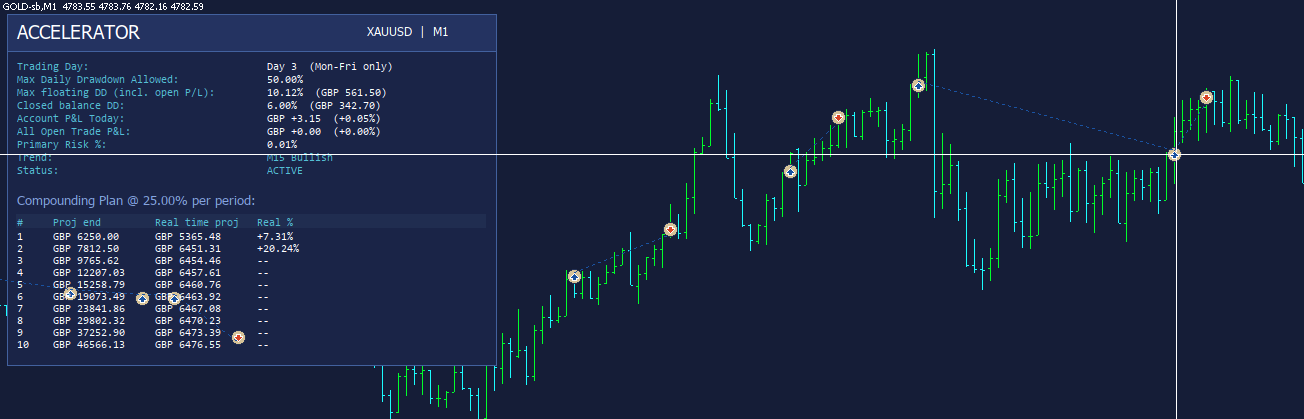
Scale-in example

The marked crosshair is a scale-in trade, added in the same direction as the primary to improve the average entry — the trade immediately before it on the chart is the one it's scaling into.
MT5 · XAUUSD · M1
Accelerator scale-in trade example on chart
05

TP & SL, visualised

For primary trades, Accelerator plots its take-profit and stop-loss levels directly on the chart for full visibility — even though these levels are managed internally by the EA rather than sent to the broker as resting orders. This keeps exact exit levels off the broker's book while still giving you a clear visual read of exactly where the bot intends to exit.

MT5 · XAUUSD · M1
Accelerator TP and SL visual representation on chart
[ HOW IT FUNCTIONS ]

How my Trading Bot (Accelerator) functions.

Accelerator is built around a disciplined higher-timeframe bias and precise lower-timeframe execution. It first establishes market direction on the 15-minute chart using structural change. That bias decides whether the bot is allowed to open a buy or a sell. Entries, scale-ins, and hedges then fire on the lower chart timeframe — so the bot stays aligned with the broader move while reacting to fresher structure on the execution chart.

Instead of a blunt classic martingale that stacks many overlapping positions, Accelerator uses a cleaner design. When price moves against the primary and conditions allow, it can scale in in the same direction to improve the average entry. When the higher-timeframe trend flips against the primary, it can hedge with an opposite trade. In both cases, the bot is engineered to net opposing volume and retain effectively one working position, continuously adjusting the average entry rather than leaving a cluttered book of open legs. The result is martingale-style recovery power with far clearer exposure: one managed basket, one average, one exit plan.

That basket is managed toward a defined profit objective (percentage of balance), so recovery is not open-ended "hope" — it is structured toward a measurable money target. Optional trailing logic on hedge legs further helps lock progress once a recovery move develops.

Compounding and daily profit protection

A second layer of discipline sits above the trade engine. When the account reaches its configured daily compounding profit target, the bot stops trading for the rest of that day. The idea is simple: once the day's growth goal is secured, it refuses to give that progress back through unnecessary late-session risk. That turns compounding from a spreadsheet concept into live behaviour — hit the target, bank the day, protect the curve.

Why this design works well together

In short: Accelerator trades with a higher-timeframe compass, executes on the lower timeframe, recovers intelligently through averaged scaling and hedging rather than uncontrolled position stacking, and knows when to stop once the day's profit objective is achieved.

[ WHAT IT DOESN'T DO ]

The limits, stated plainly.

×
Doesn't guarantee outcomes

Past behaviour of the rule set is not a projection of future results.

×
Doesn't remove market risk

Leveraged instruments can move against a position faster than the software can close it.

×
Doesn't manage your account

You hold the funds and the broker relationship — we license the software only.

×
Doesn't give advice

Nothing here is a recommendation to trade or configure the software any particular way.

BETA — COMING SOON

Next: an AI Agent that watches the market with it.

A cloud-based agent in development that monitors live conditions on your chosen instrument and can adjust configured bot parameters in real time.

See the AI Agent ↗
[ FAQ ]

Common questions.

No. Nexquant Ltd does not provide investment advice, portfolio management, or trade recommendations. Licensing this software is a decision you make independently, and you should seek independent financial advice if you're unsure whether it's right for you.

Trading leveraged instruments like gold and forex CFDs carries a high risk of loss and can result in losing all funds allocated to it. The bot's rule-based logic does not remove this risk, and its past behaviour is not a reliable guide to future performance.

A licence to run the software on your own MT5 account with your own broker — not ownership of the underlying code, not a managed account, and not a signal service. You keep full control over your funds and configuration.

No experience is required to license the bot. Full setup guidance can be provided if you'd like a hand getting everything installed and configured correctly.

Yes — if you'd like help installing the bot, configuring it, or understanding how to use it once you've licensed it, get in touch at NexQuant.Ltd@Gmail.com and we'll walk you through it.

MetaTrader 5 (MT5) is the trading platform the bot runs on. It's free to download and use — you'll just need an account with a broker that supports it. Get it directly from the official site: metatrader5.com/en/download.

A VPS (Virtual Private Server) is a remote computer that stays switched on and connected around the clock, so the bot keeps running even if your own PC is off or your home internet drops. A VPS is required for reliable, continuous operation — running it only on your home computer means the bot stops the moment your machine or connection goes down.

We partner with ForexVPS.net for trading-optimised VPS hosting. (This is an affiliate link — we may earn a small commission if you sign up, at no extra cost to you.)

An MT5 account with leverage of at least 1:500, and it must be a netting account (not hedging) — the bot's basket logic is built around netting-account behaviour. Any broker offering these settings and either XAUUSD or GBPJPY trading will work, depending on which instrument you choose.

The bot only runs while connected to your MT5 terminal. If the terminal or VPS goes offline, it stops managing open positions until connection is restored — this is a real operational limit, not a hypothetical.